Placeholders reference
Every {{placeholder}} you can use in subjects, bodies, recipients and chat messages.
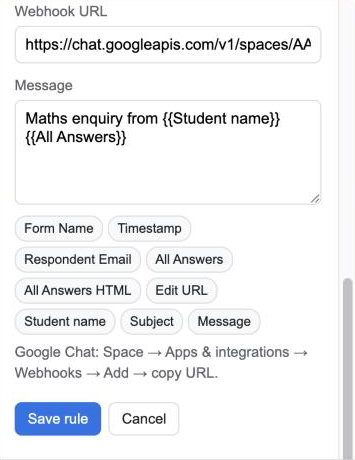
Type a placeholder by hand or click one of the chips under the text box to insert it. Placeholders are replaced with the respondent’s answers when the message is sent.
Form answers
Every question in your form is a placeholder with the same name as the question title. For a question called Student name, use {{Student name}}. Capitalisation doesn’t matter.
- Checkbox answers are joined with commas.
- Grid questions are joined with
|between rows. - Unanswered questions become empty text.
Built-in placeholders
| Placeholder | What it inserts |
|---|---|
{{Form Name}} |
The form’s title |
{{Timestamp}} |
When the response was submitted, in your form’s time zone |
{{Respondent Email}} |
The respondent’s email, if the form collects it |
{{All Answers}} |
Every question and answer, one per line |
{{All Answers HTML}} |
The same, as a formatted table (email body only) |
{{Edit URL}} |
A link the respondent can use to edit their response, if enabled in Form settings |
{{Response ID}} |
Google’s ID for the response |
Where placeholders work
| Field | Placeholders |
|---|---|
| To and CC | Yes. Put {{Respondent Email}} here to notify the respondent, or a question whose answer is an email address. |
| Subject | Yes |
| Body | Yes, including {{All Answers HTML}} |
| Chat message | Yes, except {{All Answers HTML}} |
Example
Subject: New {{Subject}} enquiry from {{Student name}}
Body:
Hi team,

{{Student name}} asked about {{Subject}} on {{Timestamp}}.

{{All Answers HTML}}