Make certificates, invoices, offer letters or receipts from a Google Docs template and a spreadsheet. One PDF or Doc per row, saved to Drive, linked back in the sheet, and emailed if you like.
Write a Google Doc and put placeholders where the data goes: {{Name}}, {{Course}}, {{Amount}}. Each one must match a column header in your sheet.
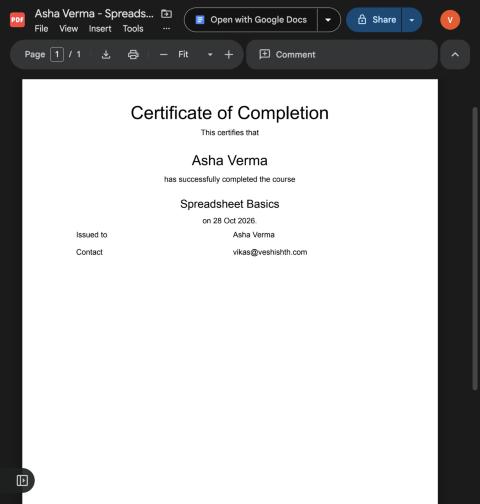
Open your spreadsheet, choose Extensions → Row to Doc → Open, and paste the template's link. The sidebar shows your column headers as placeholders.
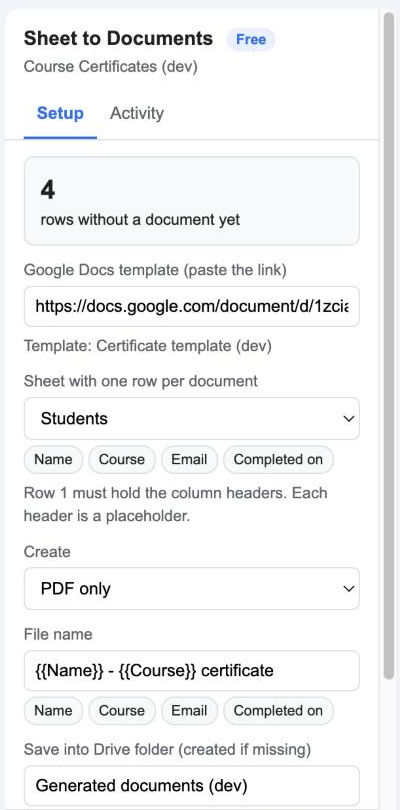
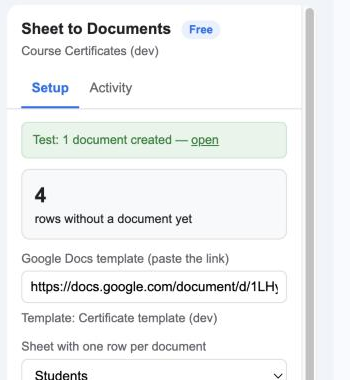
Click Test with first row. A sample PDF appears in your Drive folder and a link to open it shows in the sidebar. Nothing is written to the sheet yet.
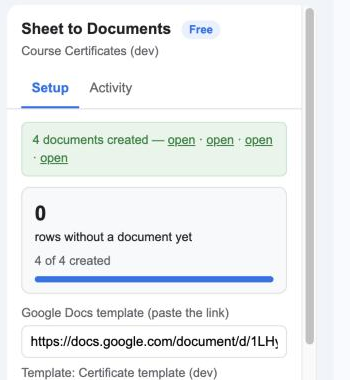
Click Create documents. A progress bar runs through every row, and a Document link column fills with the file for each one. Add rows later and run again; finished rows are skipped.
Choose what to keep. PDFs for certificates and receipts; Docs when someone still needs to edit. Learn more

Every column header is a placeholder, shown as a chip in the sidebar. Text, headings, tables and images in the template are kept. Learn more

A Document link column records the file for each row, so you always know what was made and nothing is generated twice. Learn more

Send every file to the address in a column, with the PDF attached and a personalised subject and message. Learn more

Rows are processed in small batches with a progress bar and a Stop button, so a thousand-row sheet works. Learn more

The add-on only creates files; it never asks for access to your whole Drive. Templates are read, never changed. Learn more

Start free. Upgrade when you need more.
Google's own email limit applies when you email documents, about 100 a day on a free Gmail account and 1,500 on Google Workspace.
Yes. Any Google Doc you can open works. Add placeholders where the values should go. Word files must be converted to Google Docs first (File → Save as Google Docs).
The body of the document, including text formatting, headings, tables, lists and inline images. Headers and footers are not copied in this version.
Clear that row's cell in the Document link column and run Create documents again.
Into a Drive folder the add-on creates with the name you set (default "Generated documents"). You can move or rename the folder afterwards.
One row processed. Choosing "PDF and Google Doc" still counts as one.
Yes, any time. The licence stays active until the end of the year you paid for.
We ask for the smallest set Google allows. Full details in the privacy policy.
| Permission | Why it is needed |
|---|---|
spreadsheets.currentonly | Read the rows of the spreadsheet the add-on is open in and write the Document link column. No other spreadsheet. |
documents | Open the template Doc you paste and read its contents. Google offers no narrower permission for reading a Doc by link. The template is never modified. |
drive.file | Create the output folder, the generated Docs and PDFs. This permission only covers files the add-on itself creates; it cannot see the rest of your Drive. |
script.send_mail | Email each document, if you turn that on. |
script.external_request | Talk to Google's own Drive API to create the folder and save the files. No other address is contacted. |
script.container.ui | Show the sidebar inside Google Sheets. |
userinfo.email | Know which Google account installed the add-on, for the licence. |
Training centres issue course certificates. Small businesses send invoices and fee receipts. HR teams produce offer letters. Event organisers print badges and confirmations.