Works with Google Sheets

Email Google Sheets reports on a schedule

Send a sheet, a tab or a cell range as a PDF, Excel or CSV attachment, or as a table inside the email, every hour, day, week or month. With a log of every send.

Demo video coming soon

How it works

1

Install and open

Install from the Google Workspace Marketplace, open your spreadsheet, and choose Extensions → Sheet Mailer → Open.
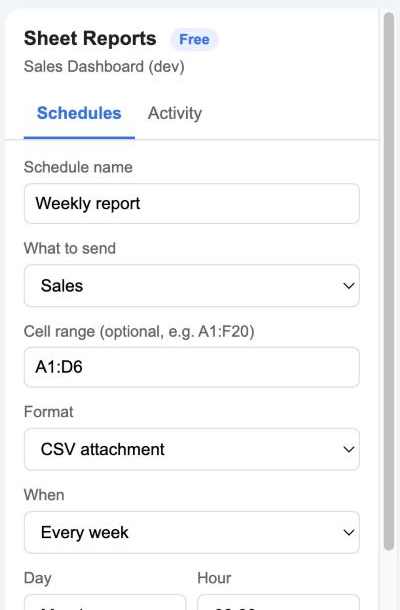
Install and open
2

Save the first schedule

A weekly PDF report to yourself is already filled in. Click Save, then Send now to get it in your inbox.
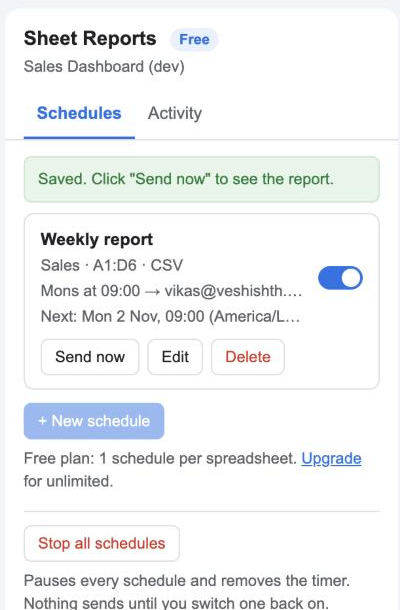
Save the first schedule
3

Choose what and when

Pick a tab or a range such as A1:F20, the format, the recipients, and the day and hour. Times use the spreadsheet's own time zone.
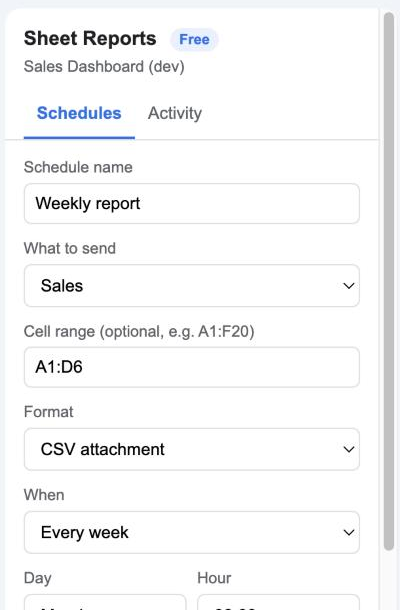
Choose what and when
4

Watch the Activity tab

Every send is listed with the file name, size and recipients. If a send fails, you get an email.
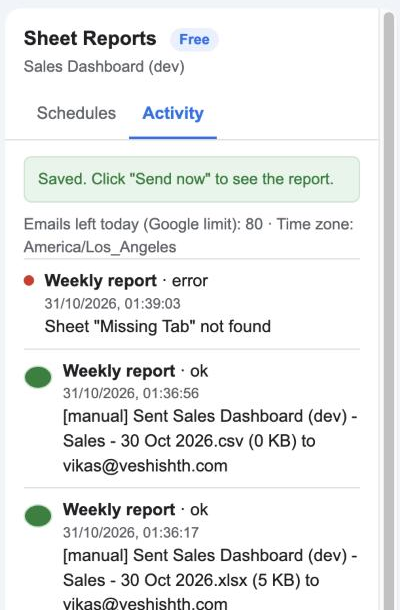
Watch the Activity tab

Top features

PDF, Excel, CSV or inline table

Attach the whole spreadsheet, one tab, or a range. Or put the table straight into the email body for people who read on their phone. Learn more

PDF, Excel, CSV or inline table

Hourly to monthly

Every hour, every day at a set hour, a weekday each week, or a day each month. The 31st on a short month becomes the last day. Learn more

Hourly to monthly

Live values in the subject

Use {{Date}}, {{Spreadsheet Name}} or a cell such as {{Sales!D6}} in the subject and message, so the email says what's inside. Learn more

Live values in the subject

Activity log

The last 30 sends with status, file name, size and recipients, so you can prove a report went out. Learn more

Activity log

Failure alerts and Stop all

If a send fails you get an email within the hour. One button pauses every schedule when you need silence. Learn more

Failure alerts and Stop all

Private and secure

Schedules are stored inside your spreadsheet. Files are generated by Google and sent from your account. Nothing is stored on our servers. Learn more

Private and secure

Ready to try it? It's free to start.

Install Sheet Mailer

Plans and pricing

Start free. Upgrade when you need more.

Free

$0
  • 1 schedule per spreadsheet
  • PDF, Excel, CSV and inline table
  • Activity log and failure alerts
  • Help Center support
Install

Pro

$29 / year per user
  • Unlimited schedules per spreadsheet
  • CC recipients
  • Email support within 1 business day
Upgrade

Google's own sending limit applies to every plan, about 100 emails a day on a free Gmail account and 1,500 on Google Workspace. The add-on shows how many you have left.

Frequently asked questions

When exactly does the report go out?

The add-on checks once an hour, so a report set for 09:00 arrives between 09:00 and 10:00 in your spreadsheet's time zone. The time zone is shown in the sidebar and can be changed under File → Settings.

Does it work while my computer is off?

Yes. Schedules run on Google's servers under your account, whether or not the spreadsheet is open.

Can I send different tabs to different people?

Yes. Create one schedule per tab, each with its own recipients. The free plan includes one schedule per spreadsheet.

Why did a report not arrive?

Open the Activity tab. Common reasons are a typo in the address, Google's daily limit, a range that no longer exists, or the email landing in spam.

Where is my data?

Schedules live inside the spreadsheet's own storage. The PDF or Excel file is generated by Google at send time and emailed from your account. We never see it.

Can I cancel?

Yes, any time. The licence stays active until the end of the year you paid for.

Permissions it asks for, and why

We ask for the smallest set Google allows. Full details in the privacy policy.

PermissionWhy it is needed
spreadsheetsRead the sheet names and cell values, and ask Google to export the file as PDF, Excel or CSV. Google does not offer an export permission limited to one file.
script.send_mailSend the report emails from your account.
script.scriptappCreate the hourly timer that checks which schedules are due, and remove it when you delete the last schedule.
script.external_requestFetch the exported file from Google's own export endpoint. No other address is contacted.
script.container.uiShow the sidebar inside Google Sheets.
userinfo.emailKnow which Google account installed the add-on, for the licence.

Who uses it

Sales managers get Monday’s pipeline as a PDF before the team meeting. Finance emails month-end expense sheets to accountants as Excel. Operations teams send a daily stock table inline to a WhatsApp-first crew who never open attachments.