Appointment reminders, order updates, event alerts. Pick the phone column, write one message with placeholders, send to everyone through your own Twilio account, and see who replied.
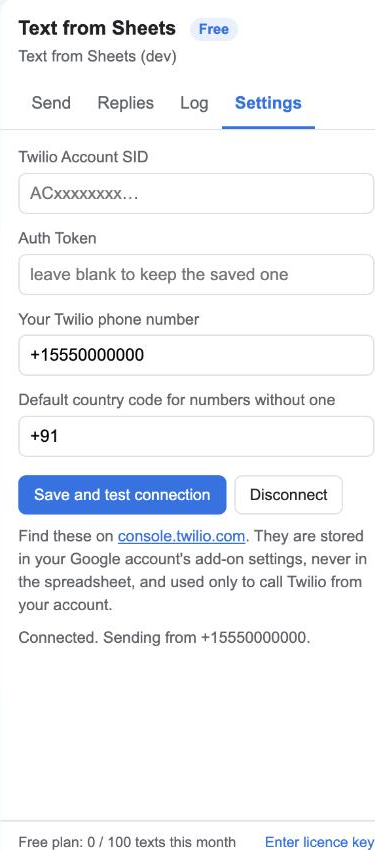
Paste your Twilio Account SID, Auth Token and phone number under Settings. The add-on checks them against Twilio straight away.
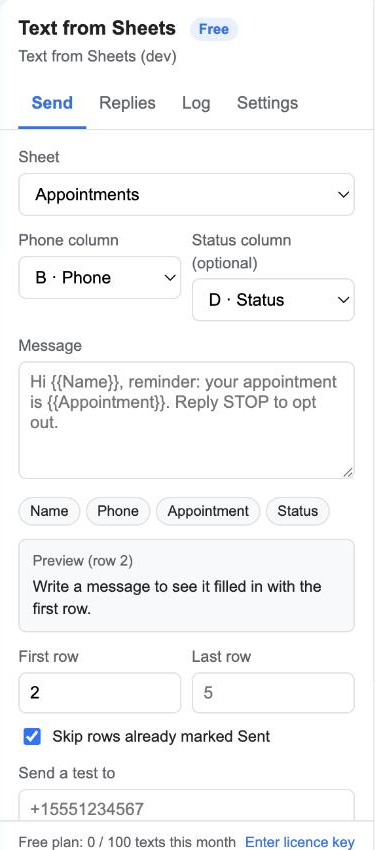
Choose the phone column, then type the text using your column headers as placeholders: Hi {{Name}}, your appointment is {{Appointment}}. A live preview shows row 1 filled in.
Send yourself a test first. Then Send to all runs down the sheet with a progress bar, writes Sent or Failed into a status column, and skips rows already sent.

The Replies tab shows the last texts people sent back to your number. Every message is recorded in an SMS log tab with Twilio's message ID.

Every column header is a placeholder. Click a chip to insert it; the preview updates as you type, with a character and segment count. Learn more

Spaces, dashes and brackets are stripped; numbers without a country code get your default one. Invalid numbers are marked Failed without being charged. Learn more

Each row gets "Sent 4 Nov 10:32" or "Failed: reason". Add rows tomorrow and run again; sent rows are skipped. Learn more

See the last 20 replies to your Twilio number without leaving the sheet. Learn more

Messages go from Google to Twilio with your credentials. You pay Twilio's per-message price; we add nothing. Learn more

The add-on reads the spreadsheet it is open in, writes the status column and log, and talks to Twilio. Nothing else. Learn more

Start free. Upgrade when you need more.
Twilio charges separately per message (about 0.8¢ in the US). A Twilio trial account can text verified numbers for free while you try it.
Yes. Sign up at twilio.com, buy a number (a few dollars a month) and copy the SID and token into Settings. The guide walks through it.
Not in this version. SMS only.
Only with a DLT-registered sender and templates on your Twilio account, which is a separate process. The add-on itself does not restrict countries.
No. Each message is a separate SMS from your Twilio number to one recipient.
Twilio handles STOP replies automatically for US and Canadian numbers and will refuse further messages to that recipient; the add-on records the failure in the status column. Always include an opt-out line.
Yes, any time. The licence stays active until the end of the year you paid for.
We ask for the smallest set Google allows. Full details in the privacy policy.
| Permission | Why it is needed |
|---|---|
spreadsheets.currentonly | Read the rows, write the status column and the SMS log tab in the spreadsheet the add-on is open in. No other spreadsheet. |
script.external_request | Send messages and read replies through Twilio's API (api.twilio.com). Nothing else is contacted. |
script.container.ui | Show the sidebar inside Google Sheets. |
userinfo.email | Know which Google account installed the add-on, for the licence and the monthly count. |
Clinics and salons send appointment reminders. Schools text parents about closures. Small shops announce order pickups. Event organisers send gate times to attendees.