Works with Google Forms

Every form response, straight into Discord

Post a message to a Discord channel the moment someone submits your Google Form. Paste a webhook URL, write the message with your form's questions as placeholders, done in two minutes.

Demo video coming soon

How it works

1

Create a webhook in Discord

In Discord, add an incoming webhook to the channel you want and copy its URL. Takes a minute; the guide shows every click.

Create a webhook in Discord
2

Paste it into the add-on

Open your form, choose the add-on from the puzzle-piece menu. A rule that posts every response is already filled in; paste the URL and click Save.
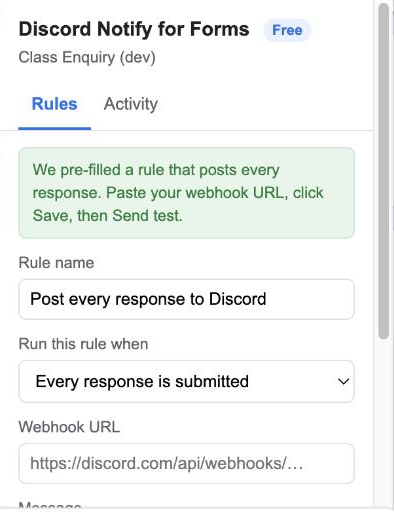
Paste it into the add-on
3

Send a test

Click Send test and watch the message appear in Discord with sample answers. Real responses post the same way, within seconds.

Send a test
4

Check the Activity tab

Every submission is listed with what was posted. If Discord rejects a message, you get an email.

Check the Activity tab

Top features

Your message, your words

Write the message yourself. Click a question chip to insert its answer, or use {{All Answers}} for everything. Learn more

Your message, your words

Post only some responses

Add a condition so only responses where, say, "Priority" is "Urgent" reach the channel. Learn more

Post only some responses

Different channels for different answers

Several rules, several webhooks. Sales questions go to #sales, support questions to #support. Learn more

Different channels for different answers

Proof of every message

An Activity tab inside the form lists each response and the result. Failures email you once an hour at most. Learn more

Proof of every message

Nothing leaves your Google account

The add-on runs inside your form and talks only to Discord's webhook address. We never see your responses. Learn more

Nothing leaves your Google account

Narrow permissions

It can read this form's responses and post to Discord. It cannot see your other forms, Drive or Gmail. Learn more

Narrow permissions

Ready to try it? It's free to start.

Install Discord Notify for Forms

Plans and pricing

Start free. Upgrade when you need more.

Free

$0
  • 1 rule per form
  • Unlimited messages
  • Activity log and failure emails
  • Help Center support
Install

Pro

$19 / year per user
  • Unlimited rules per form
  • Route by answer to different channels
  • Email support within 1 business day
Upgrade

One licence covers every form you own.

Frequently asked questions

Do I need to install a Discord app or bot?

No. An incoming webhook is a URL that Discord gives you for a channel. The add-on posts to it; nothing is installed in your workspace.

Can I post to a private channel?

Yes. Create the webhook from inside the private channel; the URL works the same way.

Can I include the respondent's email?

Yes, if the form collects emails. Use the {{Respondent Email}} placeholder.

Can I also get an email, or post to Google Chat or Telegram?

That is our Form Alerts add-on, which supports all of them in one rule. This add-on does one thing, Discord, and keeps the setup to two minutes.

Can I cancel?

Yes, any time. The licence stays active until the end of the year you paid for.

Permissions it asks for, and why

We ask for the smallest set Google allows. Full details in the privacy policy.

PermissionWhy it is needed
forms.currentonlyRead the questions and new responses of the form the add-on is open in. No other form.
script.scriptappCreate the "on form submit" trigger that runs when someone responds.
script.external_requestPost to the Discord webhook URL you paste. The add-on is limited to discord.com/api/webhooks/ addresses.
script.send_mailEmail you if a message could not be delivered (at most once an hour) and when you click Send test.
script.container.uiShow the sidebar inside Google Forms.
userinfo.emailKnow which Google account installed the add-on, for the licence.

Who uses it

Support teams watch a #tickets channel. Sales teams get every lead the second it arrives. Event organisers see registrations roll in. Schools post absence forms to the office channel.