Works with Google Sheets

=AI() for your spreadsheet

Classify, extract, translate, summarise and write, straight from a formula or a sidebar. Bring your own free Gemini key; results are cached so recalculation costs nothing.

Demo video coming soon

How it works

1

Add your Gemini key once

Open Extensions → AI Formulas → Open → Settings and paste a free key from Google AI Studio. It is stored with the spreadsheet so formulas can use it.
Add your Gemini key once
2

Type a formula

=AI_CLASSIFY(B2, "Bug, Billing, Feature request, Praise") or =AI("Write a one-line summary of", B2). Drag down like any formula.

Type a formula
3

Or fill a whole column

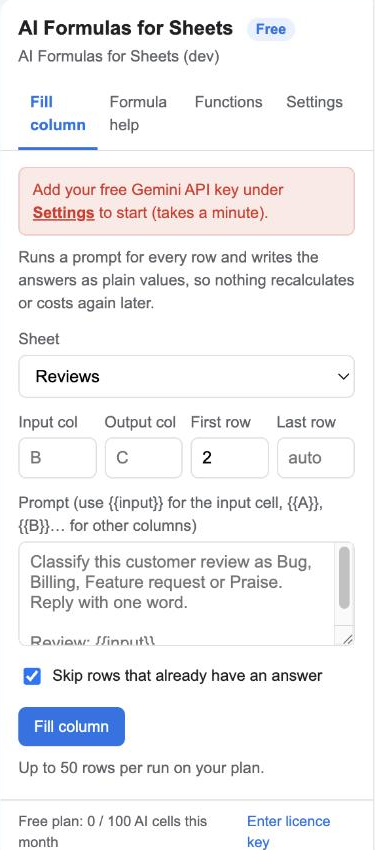
In the sidebar, pick the input and output columns, write a prompt with {{input}}, click Fill column. Answers are written as plain values with a progress bar.

Or fill a whole column
4

Ask for a formula in plain English

"Count rows where Category is Bug" becomes =COUNTIF(C:C, "Bug"), explained, with one click to insert it.

Ask for a formula in plain English

Top features

Five functions that cover most jobs

AI for anything, AI_CLASSIFY, AI_EXTRACT, AI_TRANSLATE, AI_SUMMARIZE. Each works on one cell or a whole range. Learn more

Five functions that cover most jobs

Cached, so recalculation is free

Every prompt's answer is kept for six hours. Opening the sheet again or editing elsewhere does not call Gemini or count against your plan. Learn more

Cached, so recalculation is free

Fill column writes values, not formulas

For hundreds of rows, use the sidebar. It runs in batches with progress and a Stop button, skips rows already filled, and leaves plain text behind. Learn more

Fill column writes values, not formulas

Formula help

Describe the calculation; get a Google Sheets formula that uses your actual column headers, with an explanation. Learn more

Formula help

Your key, your data

Calls go from your Google account to Google's Gemini API with your own key. Nothing passes through our servers. Learn more

Your key, your data

Narrow permissions

The add-on can read and write the spreadsheet it is open in and talk to Gemini. Nothing else. Learn more

Narrow permissions

Ready to try it? It's free to start.

Install AI Formulas for Sheets

Plans and pricing

Start free. Upgrade when you need more.

Free

$0
  • 100 AI cells a month per spreadsheet
  • All five functions
  • Fill column up to 50 rows per run
  • Formula help
  • Bring your own Gemini key (free from Google)
Install

Pro

$29 / year per user
  • Unlimited AI cells
  • Fill column up to 1,000 rows per run
  • Email support within 1 business day
Upgrade

Gemini's own free tier allows a few thousand requests a day; heavy users can enable billing on their Google project and pay Google directly, fractions of a cent per cell.

Frequently asked questions

Do I need to pay for the AI?

No. Google gives every account a free Gemini API key with a generous free tier. The guide shows the two clicks it takes.

Why does the key belong to the spreadsheet rather than to me?

Google Sheets runs custom functions without knowing who typed them, so a formula can only reach settings stored with the spreadsheet. Anyone who can edit that spreadsheet can run AI formulas with the key; share the sheet accordingly, or use Fill column, which writes plain values.

How fast is it?

A single cell takes a few seconds. A range formula over many cells runs one call per cell and must finish within Google's 30-second limit for formulas, so use ranges of up to about five cells and the sidebar's Fill column for more.

Why did a cell say "Gemini is busy"?

Google's free tier occasionally returns a 503 during peaks. The add-on retries once; if it still fails, the cell shows the message and recalculates on the next edit. Fill column simply continues with the next row.

Will it work in a shared sheet?

Yes. The key and the cache live with the spreadsheet, so collaborators see the same results without setting anything up.

Can I cancel?

Yes, any time. The licence stays active until the end of the year you paid for.

Permissions it asks for, and why

We ask for the smallest set Google allows. Full details in the privacy policy.

PermissionWhy it is needed
spreadsheets.currentonlyRead the cells you point formulas at and write the answers from Fill column and Formula help into the spreadsheet the add-on is open in. No other spreadsheet.
script.external_requestSend your prompts to Google's Gemini API (generativelanguage.googleapis.com). Nothing else is contacted.
script.container.uiShow the sidebar inside Google Sheets.
userinfo.emailKnow which Google account installed the add-on, for the licence.

Who uses it

Support teams tag tickets. Marketers write product one-liners and translate them. Researchers code open-ended survey answers. Ops teams pull order numbers and phone numbers out of pasted emails. Anyone who has ever copied a column into a chatbot and back.