Install and send your first report
From install to a PDF in your inbox in about two minutes.
1. Install the add-on
Open the add-on’s page on the Google Workspace Marketplace and click Install. Google shows the permissions it needs; each one is explained on the privacy page.
2. Open it inside your spreadsheet
Open the spreadsheet you want to send. Choose Extensions → Sheet Mailer → Open. A sidebar appears on the right.
3. Save the first schedule
The first time you open the sidebar, a schedule called Weekly report is already filled in: your first tab as a PDF, every Monday at 09:00, to your own address. Click Save schedule.
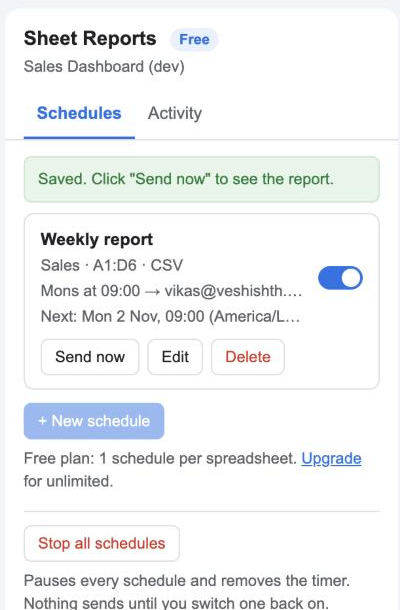
The footer changes to “Timer active (checks hourly)”. From now on the add-on checks once an hour, on Google’s servers, whether any schedule is due. Your computer can be off.
4. Send now
Click Send now. The add-on builds the PDF and emails it straight away. The green bar shows the file name and size, for example Sales - 30 Oct 2026.pdf (39 KB).
5. Check the Activity tab
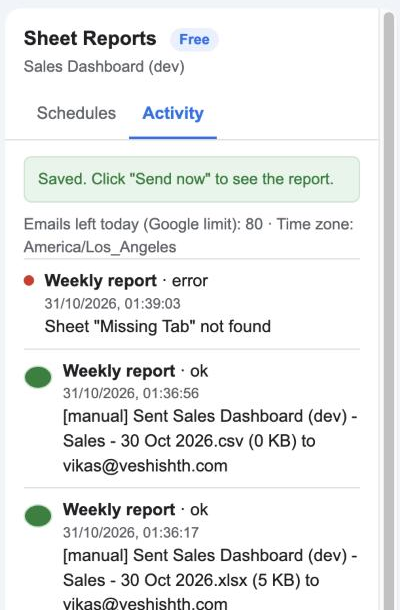
Every send is listed with a green or red dot, the time, the file and the recipients. The number of emails you can still send today under Google’s limit is shown at the top.
Next: choose what to send and when.