Install and post your first response
Webhook, rule, test message: about two minutes.
1. Create the webhook in Slack
Go to api.slack.com/apps → Create New App → From scratch, name it, pick your workspace. Open Incoming Webhooks, switch it On, click Add New Webhook to Workspace, choose the channel and click Allow. Copy the URL (it starts with https://hooks.slack.com/services/).

2. Install and open the add-on
Install from the Google Workspace Marketplace, open your form, and choose Slack Notify for Forms → Open from the puzzle-piece menu at the top. The first time, Google asks you to allow the permissions listed on the privacy policy.
3. Paste the URL and save
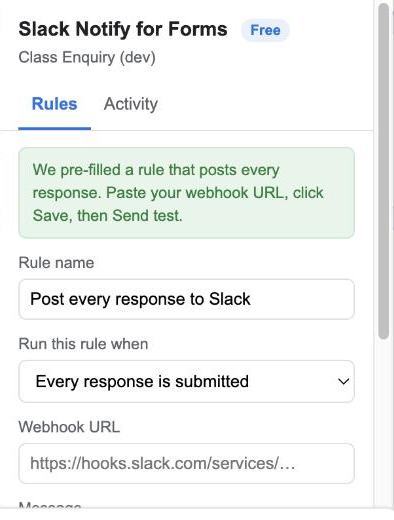
A rule called Post every response to Slack is already filled in. Paste the webhook URL, keep or edit the message, and click Save rule.
4. Send a test
Click Send test. A message with sample answers appears in the channel. From now on every real response posts the same way.

Posting only some responses
In the rule, change When from Every response to An answer is exactly…, pick the question and type the value. Only matching responses are posted.
Several channels (Pro)
Create one webhook per channel and one rule per webhook, each with its own condition. Sales enquiries go to one channel, support to another.